How Text to Speech Actually Works (And What It Can Do)
Text to speech has quietly become one of the most-used pieces of technology on the internet — built into every phone, every major browser, and a growing share of the apps people use daily. Most people interact with it without ever wondering what's actually happening between typing a sentence and hearing it spoken back. This guide breaks down the real mechanics behind text to speech technology, what separates a good voice from a robotic one, and what the tools built on it can and can't reliably do today.
What Is Text to Speech, Exactly?
Text to speech (TTS) is technology that converts written text into spoken audio using a synthesized voice, generated in real time rather than played back from a recording. That distinction matters: a TTS engine isn't retrieving a pre-recorded clip of someone saying your exact sentence — it's constructing the audio from scratch every time, which is why the same engine can read an infinite number of sentences it has never "heard" before, in a voice that never gets tired or needs a new recording session.
This is different from a voice assistant like Siri or Alexa, even though both use TTS underneath. A voice assistant is a whole system — it listens, interprets intent, decides what to say, and then uses TTS as the final step to speak the response. TTS on its own is just that last step: text in, speech out.
The Pipeline: What Happens Between Typing and Hearing
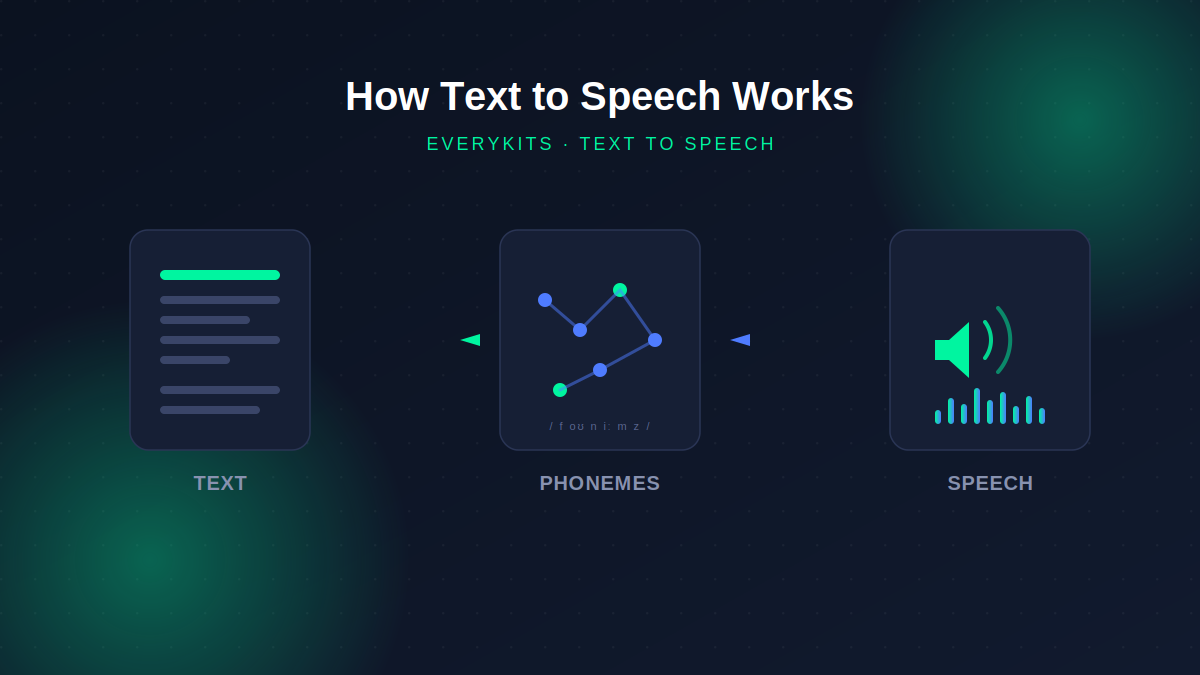
Every text to speech engine, regardless of how advanced it is, follows roughly the same three-stage pipeline.
1. Text analysis and normalization. Before a single sound is generated, the engine has to figure out what your text actually means when spoken. "Dr." needs to become "Doctor," "$42" needs to become "forty-two dollars," and "St." could mean "Street" or "Saint" depending on context ("St. Louis" versus "123 Main St."). This step, called text normalization, is where a lot of the awkward mispronunciations you've probably heard from TTS tools actually originate — not from the voice itself, but from the engine guessing wrong at this early stage.
2. Linguistic and phonetic conversion. Once the text is normalized, the engine converts words into phonemes — the individual units of sound that make up speech. This is also where prosody gets calculated: where the pitch should rise or fall, which words get stressed, where natural pauses belong. This is the single hardest part of building a TTS engine, because written text doesn't carry this information explicitly. A skilled human reader infers emphasis and rhythm from context and meaning; a TTS engine has to approximate it algorithmically, which is exactly why even good synthetic voices can sound slightly "flat" on emotionally complex or ambiguous sentences.
3. Waveform synthesis. The final stage turns the phoneme and prosody data into an actual audio waveform — the sound you hear. How this stage works is where the biggest quality differences between TTS systems come from, and it's worth understanding the three approaches that have shaped the technology's history.
Three Generations of Voice Synthesis
Concatenative synthesis was the dominant approach for years. It works by stitching together small pre-recorded fragments of a real human voice — phonemes, syllables, sometimes whole words — into new sentences. Done well, individual words sound genuinely human, because they are recordings. Done at scale across arbitrary sentences, the seams between fragments often produce the choppy, uneven rhythm that made older TTS systems easy to identify as synthetic.
Parametric synthesis took a different approach: rather than stitching together recordings, it uses statistical models to generate speech parameters (pitch, timing, spectral shape) from scratch, then builds a waveform from those parameters. This produced smoother, more consistent speech than concatenative methods, but at a cost — the voices tended to sound more clearly artificial, trading choppiness for a duller, more "synthetic" texture.
Neural TTS, the current generation, uses deep learning models trained on large amounts of recorded speech to generate waveforms directly, learning the relationship between text and natural-sounding audio rather than following hand-built rules. This is what powers the genuinely lifelike voices you hear from modern cloud AI services — and it's also, notably, computationally expensive, which is exactly why the highest-quality neural voices tend to run on remote servers rather than directly in your browser.
Browser-Based TTS vs. Cloud AI TTS
This distinction matters more than most comparisons let on, because it explains a real trade-off rather than a simple quality ranking.
Cloud-based neural TTS (the kind behind most premium "AI voice" products) sends your text to a remote server, generates audio using a large neural model, and sends the audio back. The voice quality can be excellent, but your text necessarily leaves your device to make that happen — and the service is generally speaking to a subscription or usage-based cost.
Browser-based TTS, like the EveryKits text to speech tool, uses the Web Speech API — a standard built directly into modern browsers that taps into voices already installed on your operating system. These are typically parametric or lighter neural voices, tuned to run instantly on a phone or laptop rather than a data center. The quality won't always match a top-tier cloud voice, but the trade-off is real: the conversion happens entirely on your device, nothing is uploaded anywhere, and there's no server cost or account required to use it.
Neither approach is strictly "better" — they're optimized for different priorities. If you need broadcast-quality narration for a commercial video, a cloud neural voice is the right tool. If you want to quickly hear a paragraph read back while proofreading, or listen to notes without creating an account or sending your draft anywhere, a browser-based tool is often the more practical choice.
What Text to Speech Technology Is Genuinely Good At Today
Modern TTS, across both browser and cloud implementations, handles straightforward narrative and informational text well — articles, emails, study notes, general prose. It's also become a genuinely reliable accessibility tool, giving people with visual impairments or reading difficulties like dyslexia a practical way to access written content, and it's increasingly used simply as a productivity habit — listening to a draft while doing something else, or catching awkward phrasing that's easy to miss when reading silently.
Where It Still Falls Short
Text normalization remains the most common failure point — unusual abbreviations, domain-specific jargon, and ambiguous number formats can still trip up even well-built engines. Emotional nuance is another real limit: sarcasm, subtle emphasis, and tone shifts that a human narrator would catch naturally are difficult for any current TTS system to infer purely from text. And pronunciation of uncommon words, brand names, and proper nouns is inconsistent across engines, which is exactly why tools that let you manually correct a specific word's pronunciation — rather than expecting the engine to guess correctly every time — solve a real, common problem rather than a theoretical one.
Trying It Yourself
Understanding the pipeline makes it easier to get good results out of any TTS tool: write out abbreviations and numbers the way you want them spoken, keep sentences reasonably paced, and don't expect emotional delivery from a system that's fundamentally working from text alone. The EveryKits text to speech converter runs entirely in your browser using the Web Speech API described above — no account, no uploads, and a pronunciation dictionary for exactly the tricky-word problem covered here.

Comments
Comments coming soon! In the meantime, feel free to share your thoughts on social media.